Python正则表达式实战指南
正则表达式简介
正则表达式(Regular Expression,简称 regex)是处理文本的强大工具。通过模式匹配,可以快速完成查找、提取、替换等操作。
Python 使用 re 模块处理正则表达式。
基本语法速查
| 符号 | 含义 | 示例 |
|---|---|---|
. |
任意字符 | a.c 匹配 “abc”、”a1c” |
\d |
数字 | \d\d 匹配 “12” |
\w |
字母/数字/下划线 | \w+ 匹配 “hello_123” |
\s |
空格/制表符 | \s+ 匹配连续空白 |
* |
0次或多次 | ab*c 匹配 “ac”、”abbc” |
+ |
1次或多次 | ab+c 匹配 “abc”、”abbc” |
? |
0次或1次 | ab?c 匹配 “ac”、”abc” |
{n} |
恰好n次 | a{3} 匹配 “aaa” |
{n,m} |
n到m次 | a{2,4} 匹配 “aa”、”aaa”、”aaaa” |
^ |
开头 | ^Hello 匹配开头的 Hello |
$ |
结尾 | end$ 匹配结尾的 end |
[] |
字符集合 | [abc] 匹配 a/b/c |
| ` | ` | 或 |
() |
分组 | (ab)+ 匹配 “abab” |
re 模块核心方法
import re |
实战案例
1. 提取邮箱地址
import re |
2. 提取手机号码
text = "我的手机是13812345678,备用号是139-8765-4321" |
3. 提取 URL
text = "访问 https://example.com 或 http://test.org/path" |
4. 清洗 HTML 标签
html = "<p>这是一段<b>重要</b>文字</p>" |
5. 验证密码强度
def check_password(password): |
6. 解析日期格式
text = "日期: 2024-05-30 或 2024/05/30" |
7. 提取 JSON 数字
json_str = '{"price": 99.99, "count": 100, "rate": 0.5}' |
分组与捕获
使用 () 捕获匹配内容:
text = "张三: 100分, 李四: 95分" |
命名分组:
text = "2024-05-30" |
常用模式模板
# 邮箱 |
性能优化
编译正则表达式
多次使用同一个模式时,先编译:
import re |
避免贪婪匹配
默认是贪婪匹配(匹配尽可能多),用 ? 变成非贪婪:
text = "<div>内容1</div><div>内容2</div>" |
总结
正则表达式是文本处理的瑞士军刀,掌握它能大幅提升效率。
学习路径:
- 先记住基本语法
\d,\w,*,+,? - 练习
findall,search,sub三大方法 - 掌握分组捕获
() - 积累常用模式模板
调试工具推荐:
- https://regex101.com - 在线调试,可视化解释
- https://regexr.com - 交互式学习
遇到复杂文本处理需求,第一时间想想:能否用正则表达式解决?
本博客所有文章除特别声明外,均采用 CC BY-NC-SA 4.0 许可协议。转载请注明来源 AI技术前沿!
相关推荐

2026-05-23
PyTorch深度学习入门
PyTorch 安装与环境配置# 创建虚拟环境conda create -n pytorch python=3.10conda activate pytorch# 安装PyTorch(GPU版本)pip install torch torchvision torchaudio --index-url https://download.pytorch.org/whl/cu118# 验证安装python -c "import torch; print(torch.cuda.is_available())" Tensor 基础操作import torch# 创建张量x = torch.tensor([1, 2, 3, 4])y = torch.zeros(3, 4)z = torch.randn(2, 3) # 随机正态分布# 张量运算a = torch.add(x, 2)b = x * 2c = x.view(2, 2) # 改变形状# GPU加速if torch.cuda.is_available(): x = x.cuda() 构建第一个神经网络...

2026-05-20
Python异步编程实战
为什么需要异步编程在处理大量I/O操作时,同步代码会严重阻塞程序执行。异步编程可以让程序在等待I/O时继续执行其他任务。 同步 vs 异步对比# 同步方式 - 总耗时约6秒import timedef fetch_data(url): time.sleep(2) # 模拟网络请求 return f"Data from {url}"def main(): start = time.time() results = [] for url in ['url1', 'url2', 'url3']: results.append(fetch_data(url)) print(f"耗时: {time.time() - start}秒") main() # 异步方式 - 总耗时约2秒import asyncioasync def fetch_data(url): awai...

2026-05-14
Python装饰器详解-从入门到精通
什么是装饰器装饰器(Decorator)是 Python 的高级特性,本质上是一个函数,用于「装饰」其他函数,在不修改原函数代码的情况下增加额外功能。 通俗理解:就像给手机贴膜,手机本身功能不变,但多了一层「保护」功能。装饰器就是给函数「贴膜」。 最简单的装饰器def my_decorator(func): def wrapper(): print("函数开始执行") func() print("函数执行结束") return wrapper@my_decoratordef say_hello(): print("Hello!")# 调用say_hello() 输出: 函数开始执行Hello!函数执行结束 装饰器的原理@my_decorator 等价于: say_hello = my_decorator(say_hello) 装饰器把原函数「包装」成新函数,调用时实际执行的是 wrapper。 带参数的装饰器原函数有参数时,wrapper 需要接收: de...
2026-05-26
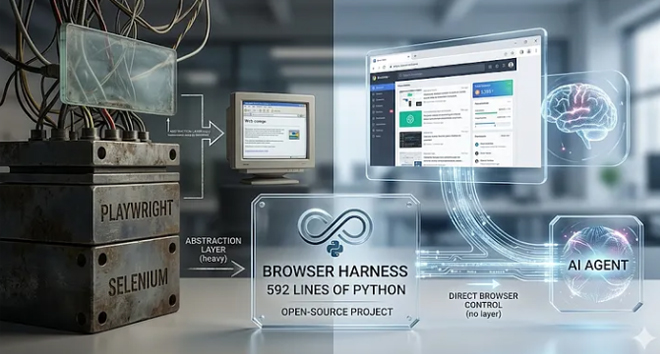
Browser Harness vs Playwright CLI - AI 浏览器自动化工具深度对比
前言AI 编程助手(Claude Code、Copilot 等)的普及催生了一个新需求:让 AI 操控浏览器完成复杂任务。无论是自动化测试、数据采集,还是帮你在网页上点来点去,AI + 浏览器都成了热门组合。 最近 GitHub 上冒出两个备受关注的项目,正好代表了两种截然不同的技术路线: 项目 Stars 开发者 语言 定位 Browser Harness 13.8k browser-use 团队 Python 自愈式 CDP 套件 Playwright CLI 10.7k Microsoft TypeScript Token 高效的 CLI 工具 今天就对它们做一个全面对比,帮你搞清楚哪个更适合你的场景。 项目简介Browser Harness “Self-healing harness that enables LLMs to complete any task.” Browser Harness 是一个轻量级 CDP(Chrome DevTools Protocol)套件,核心理念是:一个 WebSocket 直连 Chrome,中间没有任何中间层...
2026-05-12
FastAPI快速入门-现代Python Web框架
FastAPI 简介FastAPI 是现代、高性能的 Python Web 框架,基于 Starlette 和 Pydantic 构建。 核心优势: 性能媲美 NodeJS 和 Go 自动生成 API 文档(Swagger UI) 类型提示,编辑器支持友好 异步支持,高并发场景首选 安装pip install fastapi uvicorn 最简单的 APIfrom fastapi import FastAPIapp = FastAPI()@app.get("/")def home(): return {"message": "Hello FastAPI"}@app.get("/items/{item_id}")def get_item(item_id: int): return {"item_id": item_id} 运行服务器: uvicorn main:app --reload 访问: ht...

2026-05-25
Crawl4AI - 开源LLM友好型网络爬虫完全指南
项目简介Crawl4AI 是目前 GitHub 上星标最多的开源网络爬虫项目(66.2k Stars),专为 AI 时代设计。它的核心理念是将网页内容转换为干净、结构化的 Markdown,为 RAG(检索增强生成)、AI Agent 和数据管道提供高质量的数据源。 “Crawl4AI turns the web into clean, LLM ready Markdown for RAG, agents, and data pipelines.” 项目数据: GitHub Stars:66,200+ 主要语言:Python(98.8%) 许可证:Apache 2.0(可商用) 当前版本:v0.8.6 仓库地址:https://github.com/unclecode/crawl4ai 官网:https://crawl4ai.com 文档:https://docs.crawl4ai.com 为什么选择 Crawl4AI市面上爬虫工具不少,但 Crawl4AI 有几个让人眼前一亮的差异化优势: 1. 真正开源免费 不像很多”开源”爬虫需要付费账户和 API Token,Cr...
评论